ShareX: The Free, Open-Source Snipping Tool Alternative for Windows
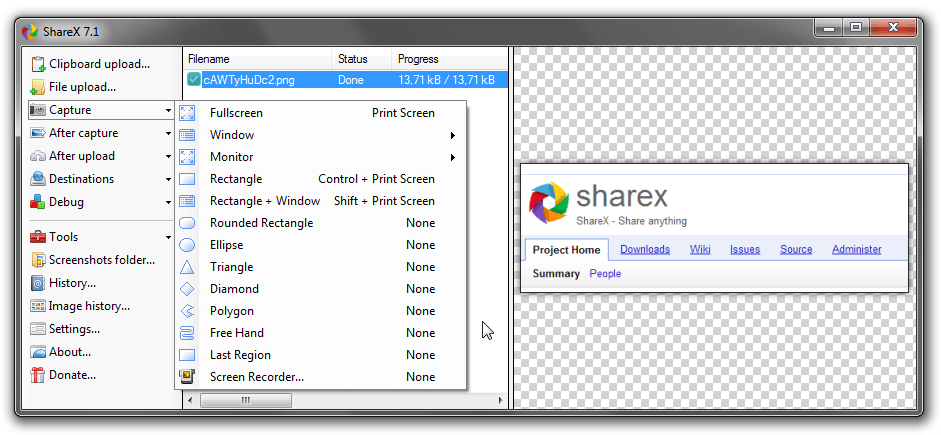
In case the Windows Snipping Tool does not satisfy you, there is an absolutely free alternative called ShareX, which is one of the best and most feature-rich alternatives that you can try. ShareX is a free and open-source screenshot capture utility designed for users who take snapshots of their screens daily and need a lot of options for customizing the process. Compared to the default snipping tool, ShareX sacrifices ease of use for advanced options. This article covers what it can do, what it offers in comparison with the default Windows screenshot capture utility, and whether it is worth trying for your workflow.
What Is ShareX?
ShareX is a free, open-source software application for advanced screenshotting and screencasting purposes on the Windows operating system. The application has evolved from being an ordinary screenshotter into a powerful productivity app favored by developers, designers, support personnel, and content creators. As the name suggests, being an open source project, the whole code base of the program is made available to the public for inspection and further development. The central principle behind the idea of the application is flexibility. Unlike many other applications that require you to capture the screen and then do something else, ShareX provides you with an option to choose not only how to capture the image but also what actions to perform after capturing and where to save it.
Key features
ShareX vs. the Windows Snipping Tool
The Windows Snipping Tool is intentionally minimal. It captures a region or window, offers light annotation, and lets you save or copy the result. For occasional, casual use, that is perfectly fine, and its simplicity is a genuine strength. ShareX approaches the same job from the opposite direction, assuming you capture often and want to remove the repetitive steps around each screenshot. The Snipping Tool has no scrolling capture, no built-in screen recording with editing, and no automation, so grabbing a full-length webpage or recording a quick tutorial falls outside its scope. The trade-off is straightforward: the Snipping Tool is easier to pick up but stops early, while it asks for a little setup in exchange for far greater capability. If your screenshots rarely leave the clipboard, the default tool is enough; if they feed documentation, tickets, or content, ShareX quickly earns its place.
Pricing and Platforms
|
Detail |
Information |
|
Price |
Free (open-source) |
|
Platforms |
Windows |
No package among the premium options and paywalled services is offered here. The use of all services offered by ShareX is entirely free, which makes it an interesting choice for both individuals and economically-minded institutions.
Pros & Cons
Pros
Cons
Real-World Use Cases
ShareX shines inside a daily workflow. Support teams answer tickets faster with an annotated screenshot or short recording that pinpoints exactly where to click. Developers pair a region capture of a bug with a recording of the reproduction steps, giving teammates far more context than words alone. Technical writers document long screens with scrolling capture, while content creators trim demos on the spot.
Tips for Getting Started with ShareX
The easiest method of enjoying ShareX is to avoid setting up everything immediately from scratch. Instead, go with default settings, learn the shortcut for capturing the whole region, and use ShareX just as a good old screenshot application for several days. After you feel comfortable with the process, open “After capture tasks” and activate a single automation option, like saving to a certain directory or storing an image path on the clipboard. Then gradually start creating your own workflows depending on your behavior, like a workflow that would annotate, save, and copy in one sequence or consistent file names for organizing screenshots.
Who Should Use ShareX?
ShareX is a great fit for power users who make a habit of capturing and sharing images all the time, whether they be programmers or tech writers, support personnel, or even content creators. For those who always need scrolling screenshots, screen captures, or automated processes for capturing and uploading, it will save significant time on its own. It may not be for the person who simply needs to capture a single image once in a while. If your intention is to point and shoot with nothing set up beforehand, the setup time might actually defeat the purpose. But then again, any time spent setting it up is worth it because of how it pays off.
Final Verdict
Among all the snipping tool alternatives, ShareX ranks high on the list for those using the Windows operating system who are ready for something better than the basic utility. This software is free, fully transparent, and offers a wide range of capture, recording, and automation tools to handle everything from basic screenshots to advanced documentation processes. The downside to using ShareX is that it is not easy to use straight away. However, once you get accustomed to it, this tool will save you both time and money, providing professional-quality results without any cost