Screenpresso Review: A Fast, Organized Snipping Tool Alternative for Windows
If you have ever felt boxed in by the Windows Snipping Tool, you are not alone. It handles the basics, but it leaves your captures scattered and offers little beyond a quick crop. Screenpresso steps in as a snipping tool alternative that keeps capturing simple while adding the organization and editing muscle that power users actually need. Built for Windows, Screenpresso is a lightweight application designed for people who take screenshots all day: support agents, technical writers, teachers, and anyone documenting a process. It balances a clean, get-out-of-your-way interface with a surprisingly deep feature set, and it runs without a formal install. In this review, we will look at what it does, how much it costs, and whether it deserves a spot in your workflow.
What Is Screenpresso?
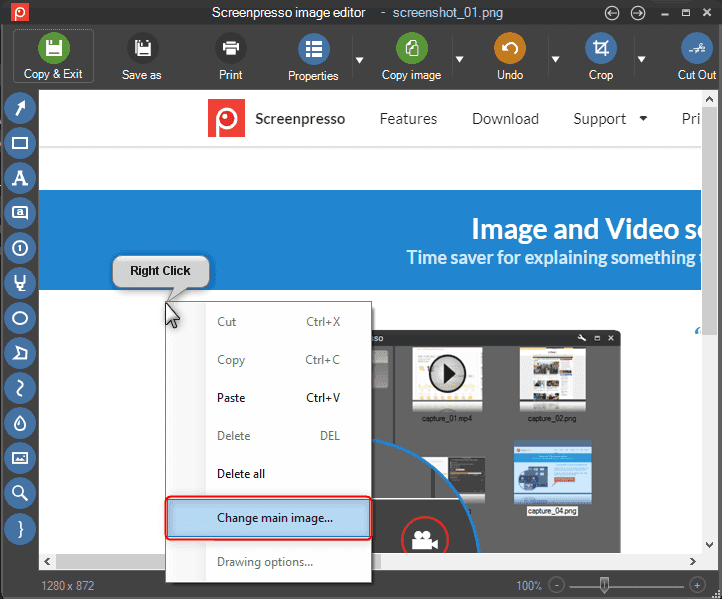
Screenpresso is a fast screenshot application that emphasizes smart organization and workspace management. Where the default Windows tool captures an image and then forgets about it, Screenpresso treats every screenshot as part of a managed library. Captures are automatically saved and sorted into a central workspace, so you spend less time hunting through your Downloads folder and more time getting work done. The appeal is that it does not sacrifice speed for features. You can grab a region, mark it up, and share it in seconds, but it scales up when you need to annotate a tutorial or keep a tidy archive of everything you have captured.
Key Features of Screenpresso
How Screenpresso Workspace Organization Works
The workspace is what separates Screenpresso from a plain capture utility. Think of it as a lightweight gallery that lives inside the app, where each screenshot lands automatically with a thumbnail, timestamp, and file details. From the workspace, you can rename items, group related captures, and pull any image back into the editor for another pass. For someone building documentation, this is a genuine time-saver. Imagine writing a ten-step setup guide: you capture each screen in order, they stack neatly in the workspace, and you annotate them one after another. What used to be a scavenger hunt becomes a smooth, linear process.
Screenpresso vs. the Windows Snipping Tool
The Windows Snipping Tool is fine for a one-off capture, but it shows its limits the moment your needs grow. It offers basic capture modes and a minimal markup layer, then hands you a file to manage entirely on your own. There is no library, no sorting, and only rudimentary editing. Screenpresso closes every one of those gaps. It matches the Snipping Tool on speed and ease of use, then adds automatic saving, a browsable workspace, and a richer editor with effects, text, and callouts. The portable design is another win, since Screenpresso can travel on a USB stick. The trade-off is that it is a separate download rather than a built-in utility. For anyone who captures more than the occasional screen, the upgrade in capability is hard to ignore.
Pricing and Platforms
Screenpresso keeps things approachable with a free tier and a one-time paid upgrade.
|
Detail |
Information |
|
Free version |
Yes, fully functional for everyday capture |
|
Pro version |
$29.99 |
|
Platform |
Windows |
|
Rating |
4.6/5 on G2 |
The free version covers the core capturing, organizing, and editing needs for most people, while the Pro version at $29.99 unlocks the advanced capabilities heavier users will appreciate. Its 4.6/5 rating on G2 reflects a generally happy user base.
Pros and Cons
Pros
Cons
Who Should Use Screenpresso?
Screenpresso is a natural fit for anyone on Windows who captures screenshots often enough to care about where they end up. Technical writers and trainers will love the workspace organization for building step-by-step guides. Support and QA teams benefit from the quick annotation tools when logging bugs. Everyday users who simply want a more capable snipping tool alternative without a steep learning curve will feel right at home. If you work across macOS or Linux, this is not the tool for you, since it is Windows-only. And if you dislike being nudged toward updates, the frequent prompts may test your patience. For the target Windows audience, though, the trade-offs are minor.
Final Verdict
Screenpresso earns its reputation as a fast, practical snipping tool alternative. It respects your time with quick captures and light system demands, then goes further with a genuinely useful organization system and a friendly built-in editor. The unintuitive licensing and update prompts are real annoyances, but they do little to undermine the core experience. For Windows users who want more than the basics without the bloat, Screenpresso is an easy recommendation, and the free version means you can try it risk-free.