ScreenRec Review: A Free, Lightweight Snipping Tool Alternative With HD Recording
Windows’ Snipping Tool is good enough to get you quick rectangles from your screen, but when it comes to video recording, private content sharing, and cross OS functionality, it simply runs out of steam. If you have ever wanted something more from your screen recorder without affecting the performance of your PC, consider checking out ScreenRec. ScreenRec is a true alternative to the Snipping Tool that combines instant screenshot capturing, lag-free high-definition screen recording, and private sharing into a single package for free. In this article, we will discuss its capabilities, strengths, comparisons with the default Windows snipping tool, and potential users.
What Is ScreenRec?
ScreenRec is a lightweight application built to deliver high-quality screenshots and HD screen recording without lag. Its whole design philosophy leans on speed and simplicity, so it launches fast, captures instantly, and stays out of your way. Rather than bolting a screenshot feature onto a heavy editing suite, it keeps the core capture experience clean and quick. That focus makes it appealing to anyone frustrated by the limits of the default Windows tool. You get one-click screenshots and video recording, plus secure link sharing, without paying anything or juggling multiple programs.
Key Features of ScreenRec
Every headline feature in ScreenRec is built around one idea: capture quickly, share instantly, and never make the user wait.
ScreenRec vs. the Windows Snipping Tool
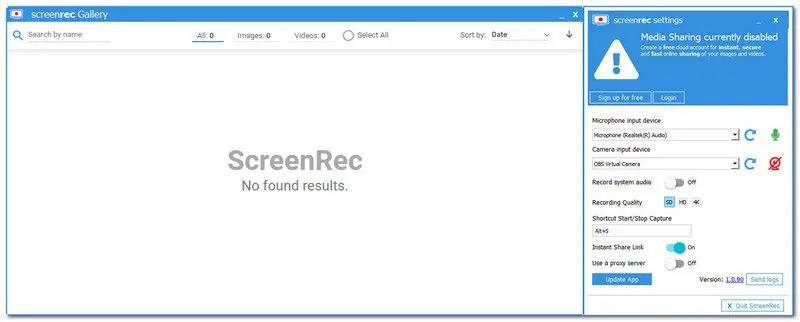
The Windows Snipping Tool is dependable for static screenshots, but its scope is narrow. It captures images, offers light markup, and stops there. ScreenRec covers that same still-image ground and then goes well past it. The clearest difference is video: the Snipping Tool cannot record your screen at all, while ScreenRec makes HD recording a core feature. Sharing is another gap, since the built-in tool leaves you to save a file and arrange delivery, whereas ScreenRec generates a private link the instant you finish. Platform reach differs too, as the Snipping Tool is Windows-only while ScreenRec runs on Windows, Mac, and Linux. If all you do is grab a rectangle and paste it, the default may feel adequate, but the moment your needs grow, ScreenRec is the more capable snipping tool alternative.
Real-World Use Cases
ScreenRec easily integrates into a few day-to-day situations. IT support and quality assurance employees are able to capture a bug as it occurs and then send the footage off to the developers without needing to write down instructions about how to replicate the problem. Teachers and people who produce tutorial content are able to create their tutorials or videos in high definition without having to worry about lugging around a bulky recorder. Managers are able to post a video message without the need for an actual meeting, while remote workers in various time zones are able to post video messages asynchronously.
Tips for Getting Started With ScreenRec
Because ScreenRec is deliberately simple, there is little learning curve, but a few habits help. Learn the capture keyboard shortcut early so that grabbing a screenshot or starting a recording becomes muscle memory. Sign in so your captures sync to encrypted cloud storage and your share links generate automatically. Do a quick dry run before recording a tutorial so the final take stays tight, since the tool is not built for heavy trimming afterward.
Pricing and Platforms
ScreenRec keeps things refreshingly simple on cost and availability.
|
Detail |
Information |
|
Price |
Free |
|
Platforms |
Windows, Mac, Linux |
|
Rating |
4.4/5 (G2) |
It is difficult to find a totally free software application that works across all three popular desktop operating systems, but the rating of 4.4/5 on G2 means that users are truly happy with this app.
Pros and Cons
Pros
Cons
Who Should Use ScreenRec?
ScreenRec will definitely be a great fit for users who prioritize capturing and distributing their recordings over editing. Creating quick tutorials, capturing bug reproduction videos, sending explainer clips to other members of your team- all these tasks will be performed flawlessly due to fast screenshots, lag-free recording, and private video messaging features. It is also quite obvious that the cross-platform feature will suit those who need to work across different Oss, which means that the app is great for capturing screenshots and videos on Windows, Mac, and Linux machines. In case your work involves more annotation and editing, then perhaps there is no need to use ScreenRec, since there are other apps that offer better editing and annotation features.
Final Verdict
Overall, when it comes to a snipping tool replacement, ScreenRec will definitely be able to do what you want it to do, which means that fast screenshots, lag-free HD video recording, and video messaging features will work flawlessly and free of charge. On the flip side, the editing capabilities of the app are rather limited.